
#️⃣
Part number
Use the identifier customers, dealers, or internal teams need when ordering or requesting the part.
Practical catalog data guide
The goal is not to create the largest possible spreadsheet. It is to give every customer-facing diagram, collection, and workflow a dependable route to the correct orderable part.
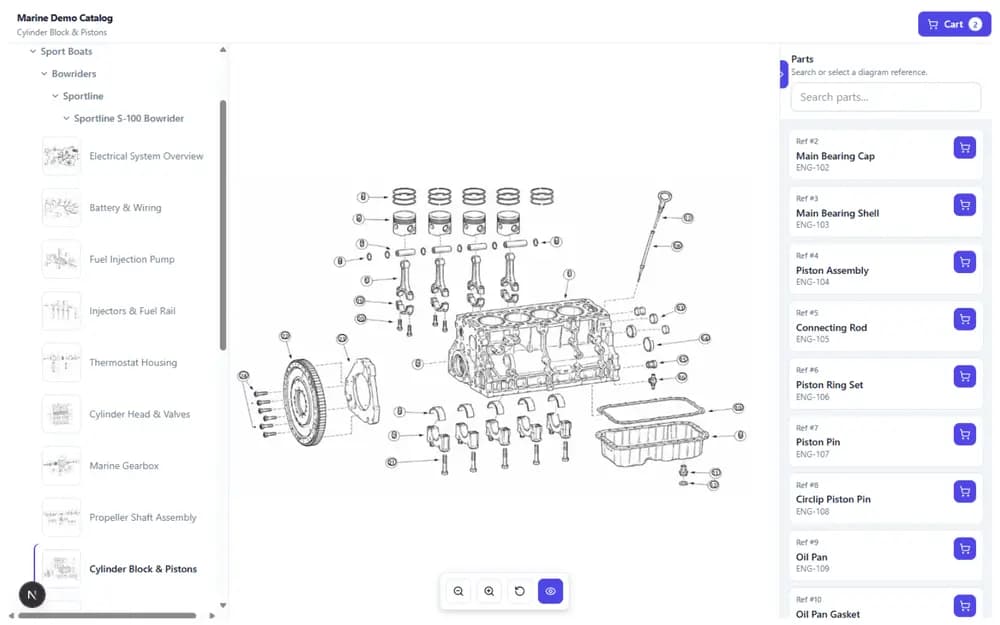
Before choosing fields or rebuilding a catalog, map the decisions someone makes when they need a replacement part.
A customer or technician normally starts with a machine, assembly, model, or exploded view. They then need to recognize the correct callout, understand which part is currently orderable, and move into a quote, cart, or support process.
Your data structure should support that journey. Internal fields are useful only when they help your team maintain the catalog or help the user identify and obtain the right part.
Keep reusable commercial and descriptive information separate from the diagram position where the part appears.
The exact fields depend on your business, but these are common building blocks for customer-facing parts lookup.
Use the identifier customers, dealers, or internal teams need when ordering or requesting the part.
Use a recognizable name rather than relying only on an internal code or abbreviated source description.
Add the context needed to distinguish similar parts, variants, kits, or applications.
Store explicit prices for the markets and workflows where customer-facing pricing is required.
Maintain translated names and descriptions where the catalog serves multiple regions or audiences.
Make it clear whether a part should remain visible and usable in active customer workflows.
A part may appear in many schematics, but each appearance can have its own callout number, quantity, and assembly context.
Avoid recreating the same part record for every exploded view. Instead, maintain the part once and connect it to the relevant number labels and schematics.
This separation lets your team correct a shared name, description, price, or image without repeating the same maintenance across every diagram. At the same time, each schematic can preserve the reference and quantity that belong to that specific assembly.
Automation can reduce repetitive work, but ambiguity and incomplete source material still require human decisions.
Confirm that number labels are present, readable, and positioned on the correct location in the diagram.
Review whether the reference, part number, quantity, and description line up with the relevant assembly.
Link, unlink, or replace the associated part where the source material does not produce a dependable result.
Treat the customer-facing diagram as an approved catalog output rather than a raw extraction result.
Groups are useful when a set of parts needs the same treatment for pricing, filtering, maintenance, or another catalog workflow.
Select the exact parts that belong together when the business rule depends on a curated list or commercial decision.
Define reusable conditions based on supported fields such as part number, text, source, category, status, or price, then preview the matching parts.
Groups should not be used to hide poor source data or to merge records that represent different part numbers. Their value is in applying a clear, repeatable decision to a known set of shared parts.
An old part number should not simply disappear when a newer or preferred part becomes available.
Keep the original part recognizable and connect it to the appropriate replacement. Record whether the relationship is official, aftermarket, or compatible, add useful notes, and identify the preferred option where applicable.
This gives customers and service teams a route forward when they search an older manual or encounter a superseded number.
A useful structure is one your team can keep accurate when prices, descriptions, replacements, and product ranges change.
Use structured files to create or update part records, while reviewing failures and unexpected source values.
Decide who reviews unmatched callouts, missing part numbers, replacement relationships, and publishing decisions.
Use maintained parts across schematics and collections instead of rebuilding the same catalog information repeatedly.
You do not need perfect source material to begin, but you should know where review and decisions are required.
The source data includes a stable identifier that can be used to maintain and search each part.
A user can distinguish the part without relying entirely on internal shorthand.
Your team can confirm or correct the relationship between callouts, BOM rows, and parts.
Someone is responsible for confirming supersession and preferred replacement relationships.
You know which markets need localized descriptions, prices, or catalog variants.
Extracted or imported data is reviewed before it becomes part of the customer experience.
Structuring spare parts data
Keep the model practical and aligned with the experience you actually want to publish.
No. You can begin with existing manuals and structured part lists, provided your team can review exceptions and make clear decisions about the information that becomes customer-facing.
Only when they truly represent the same orderable part according to your business system. Similar formatting or descriptions are not enough on their own. PartGrid does not automatically merge fuzzy duplicates.
Yes. A shared part can be connected to multiple diagrams and callouts while keeping the diagram-specific reference and quantity in the relevant schematic context.
Maintain replacements as explicit relationships between part records. This keeps the old number searchable while giving the user a clear preferred or compatible next option.
Ambiguous callouts, missing part numbers, unexpected import values, replacement decisions, and final publishing approval should remain visible decisions for your team.
Bring an exploded-view manual and a representative parts list. We will map how shared records, diagram matching, groups, replacements, and publishing could work for your customer journey.