
1
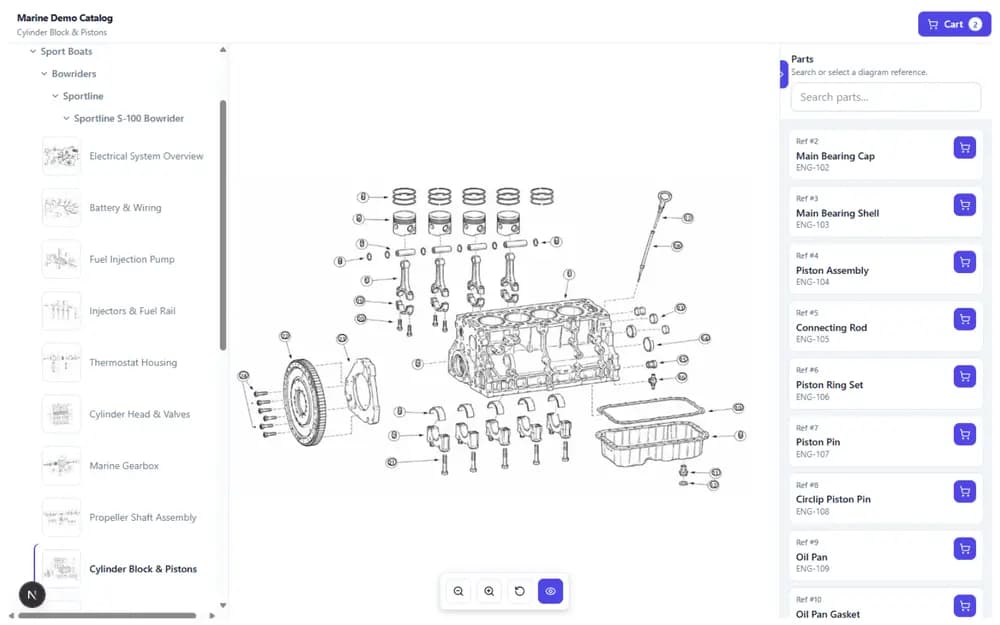
1. Select the machine and assembly
Open the diagram that matches the equipment and area being serviced.
Service technician parts lookup
Use interactive exploded views, current part records and replacement guidance to move from a visible component to the correct orderable part.
 View a live example
The starting point is usually a machine, an assembly and a component that needs inspection or replacement. Parts lookup should preserve that context instead of forcing the technician to search disconnected manuals and spreadsheets.
Move from equipment context to a current service part without losing the visual relationship.
Open the diagram that matches the equipment and area being serviced.
Use the exploded view and callout position instead of guessing the part name.
Check part number, description and available replacement guidance before selection.
Send the selected part into a quote, cart or external ordering process.
Older machines may still show a legacy number in the manual or on a previous service record. The technician should not have to leave the assembly context and search several systems to discover whether that number is still orderable.
Part replacement and supersession guidance can connect the old reference to the preferred current service part. Because the relationship remains attached to the catalog record, customers, dealers and internal teams can follow the same guidance.
Use assembly context when the exact part number is unknown.
Guide users from legacy references to the preferred current replacement.
Keep selected parts connected to ordering, quoting or support workflows.
PartGrid provides the catalog and identification layer rather than replacing the ERP, field-service platform or ordering system. The technician can identify the component visually, verify the current record and then pass the selected part to the next workflow.
That handoff can lead to a cart, quote or external process. The catalog can also be placed in an existing service portal through an embedded viewer or collection, keeping lookup close to the technician's normal work environment.
Service workflow questions
How technician lookup fits with existing catalogs and systems.
No. PartGrid provides the visual parts lookup and catalog experience, then connects selected-part context to existing commercial or service workflows.
Yes. Interactive diagrams connect visual callouts to structured part records so technicians can identify components from assembly context.
Replacement and supersession relationships can guide the technician from a legacy reference to the preferred current part.
Map a machine, exploded view and current parts data to a focused service workflow.