
Upload source material
Start from an exploded-view image, technical drawing, or PDF catalog page.
Interactive parts diagrams
PartGrid turns exploded views, technical drawings, and PDF-derived catalog pages into interactive parts diagrams that users can zoom, pan, inspect, and connect to the right part data.
Zoom and pan large parts diagrams
Connect callouts to part rows
Guide users from visual lookup to quote, cart, or handoff
Pump assembly
Interactive parts diagram
Replacement guidance
Original seal is superseded. Preferred replacement available.
Ref 12
Impeller housing seal
IH-2218
Ref 13
Washer M8 stainless
WA-008
Ref 14
Outlet elbow assembly
OE-441
Live demo
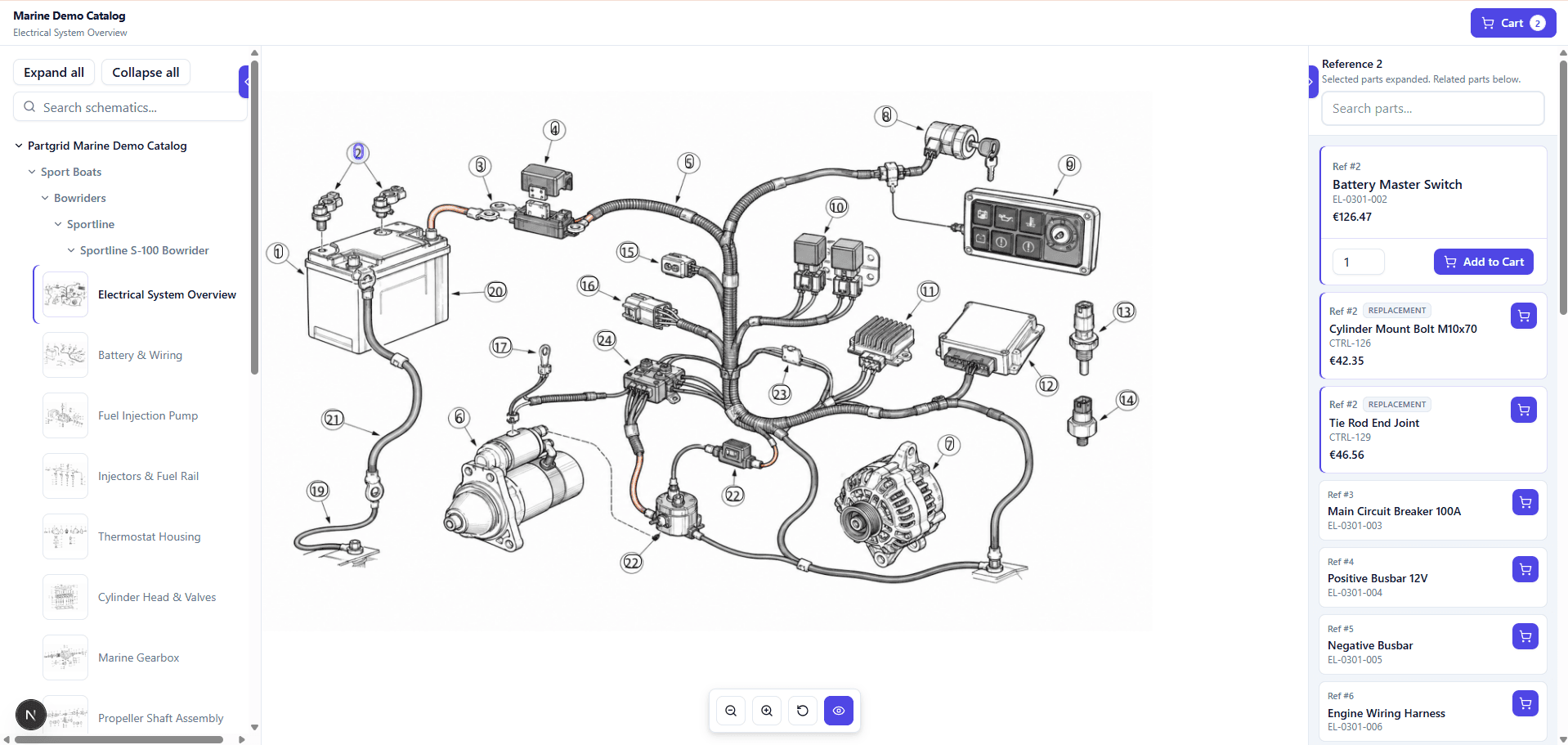
Explore a public PartGrid demo to see how an exploded-view diagram can connect to structured part data. Zoom into the diagram, inspect callouts, browse the parts list, and see how visual part identification becomes faster than searching through a static PDF.
Marine Demo Catalog
Switch market settings to preview the same catalog in different dealer contexts.
Current embed: language EN, currency EUR
Open directStatic diagram problem
Static diagrams create friction. Users find a number in an exploded view, scroll to a parts table, copy a part number, search somewhere else, and still may not know whether the part is current, replaced, or correct.
Customers cannot click callouts in static PDFs.
Dealers compare diagram labels with separate parts tables by hand.
Support teams answer repeated 'which part is this?' questions.
Old part numbers and replacements are hard to surface at selection time.
From source to interactive
PartGrid gives teams a practical path from old diagrams and manuals to modern parts catalogs. AI-assisted detection speeds up the first pass, while review and correction keep teams in control before publishing.
Start from an exploded-view image, technical drawing, or PDF catalog page.
Use AI-assisted number detection to speed up the first pass.
Connect callouts to part records, then review and correct results before publication.
Use the diagram in catalogs, collections, embeds, dealer workspaces, or ecommerce flows.
Diagram and parts list
In a static catalog, the diagram and BOM table are often separate. PartGrid connects those views so a selected diagram label can highlight the related part row, and a selected row can point back to the visual reference.
Pump assembly
Interactive parts diagram
Replacement guidance
Original seal is superseded. Preferred replacement available.
Ref 12
Impeller housing seal
IH-2218
Ref 13
Washer M8 stainless
WA-008
Ref 14
Outlet elbow assembly
OE-441
Capabilities
PartGrid interactive parts diagrams let users explore technical drawings visually and connect diagram references to structured part data.
Let users inspect diagram labels and connect visual references to structured part data.
Help users browse or search the related parts list when they know a name, number, or description.
Where configured, show replacement or supersession guidance near the moment of identification.
Move selected parts into quote, cart, dealer, ecommerce, or custom handoff workflows where configured.
Built for parts diagrams
PartGrid is built around exploded-view diagrams, schematic pages, callout numbers, BOM rows, and parts catalogs. That makes it useful where visual identification matters.
Embedded catalogs
Interactive parts diagrams can be embedded into websites, dealer portals, customer portals, ecommerce pages, documentation pages, or internal tools. Users can interact with the diagram without leaving the environment where they search, quote, buy, or support parts.
Business impact
Interactive parts diagrams can help reduce repeated part-identification questions, improve dealer self-service, support quote and cart workflows, and make parts catalogs easier to use across customer-facing and internal channels.
Try this with your diagramFAQ
Interactive parts diagrams can help reduce repeated part-identification questions, improve dealer self-service, support quote and cart workflows, and make parts catalogs easier to use across customer-facing and internal channels.